
FuocoAtal'utek
The Windcaller dialog becomes a map: click a pin, off you fly.
Latest version 12.1-261013a
The Windcaller dialog becomes a map: click a pin, off you fly.
Latest version 12.1-261013a
Talk to an Amani Windcaller in the Vaults of Atal'Utek and, instead of a list of dialog options, you get the zone map with clickable flight pins: a green dot where you stand, the classic taxi boot on the destinations you can reach, a red X on the flight points you haven't activated yet. Click a boot, off you fly.
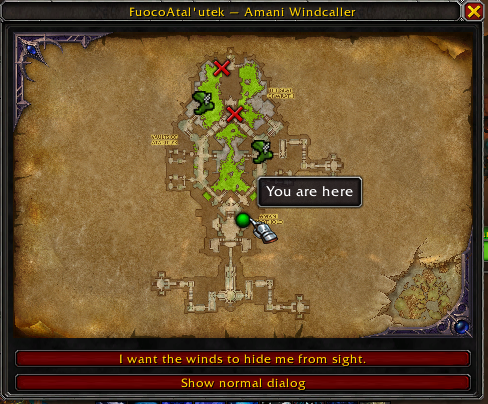
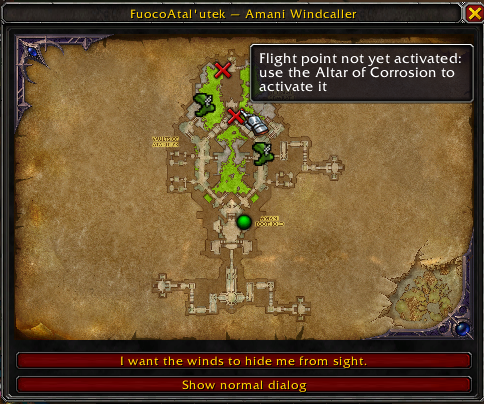
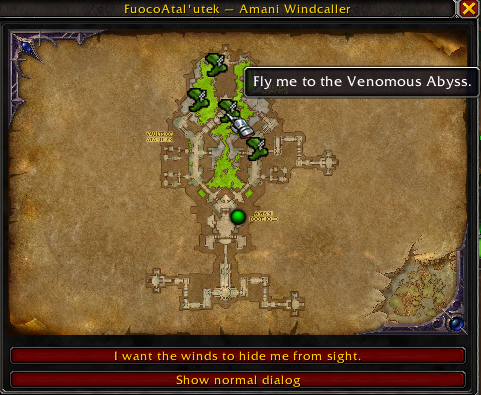
A draggable map window takes the place of the option list. The dialog stays alive underneath, so nothing breaks.
Hover a pin to see the destination in your own language: the names come straight from the game, never translated by hand.
The “hide me in the winds” blessing sits right under the map.
“Show normal dialog” brings the stock list back at any time, session intact.
The window and the dialog close together, and any other dialog in the game is untouched.
There is no menu and nothing to configure: everything happens on the map window that replaces the Windcaller's dialog.
 FuocoNote: A World of Warcraft addon that tracks the mounts, pets, toys and illusions you're still missing, and where to get them.
 FuocoGoldFarm: Every gold source of Midnight in one window: world quests, weekly chests and Special Assignments, with timers, a line to the nearest one and every character at a glance.